Bring your AUv3 instruments and effects together. Route MIDI, shape sound and record your ideas in a hands-on workspace for iPhone and iPad.
iPhone & iPad · Mac in development
Showing: iPad. Choose another device anytime.
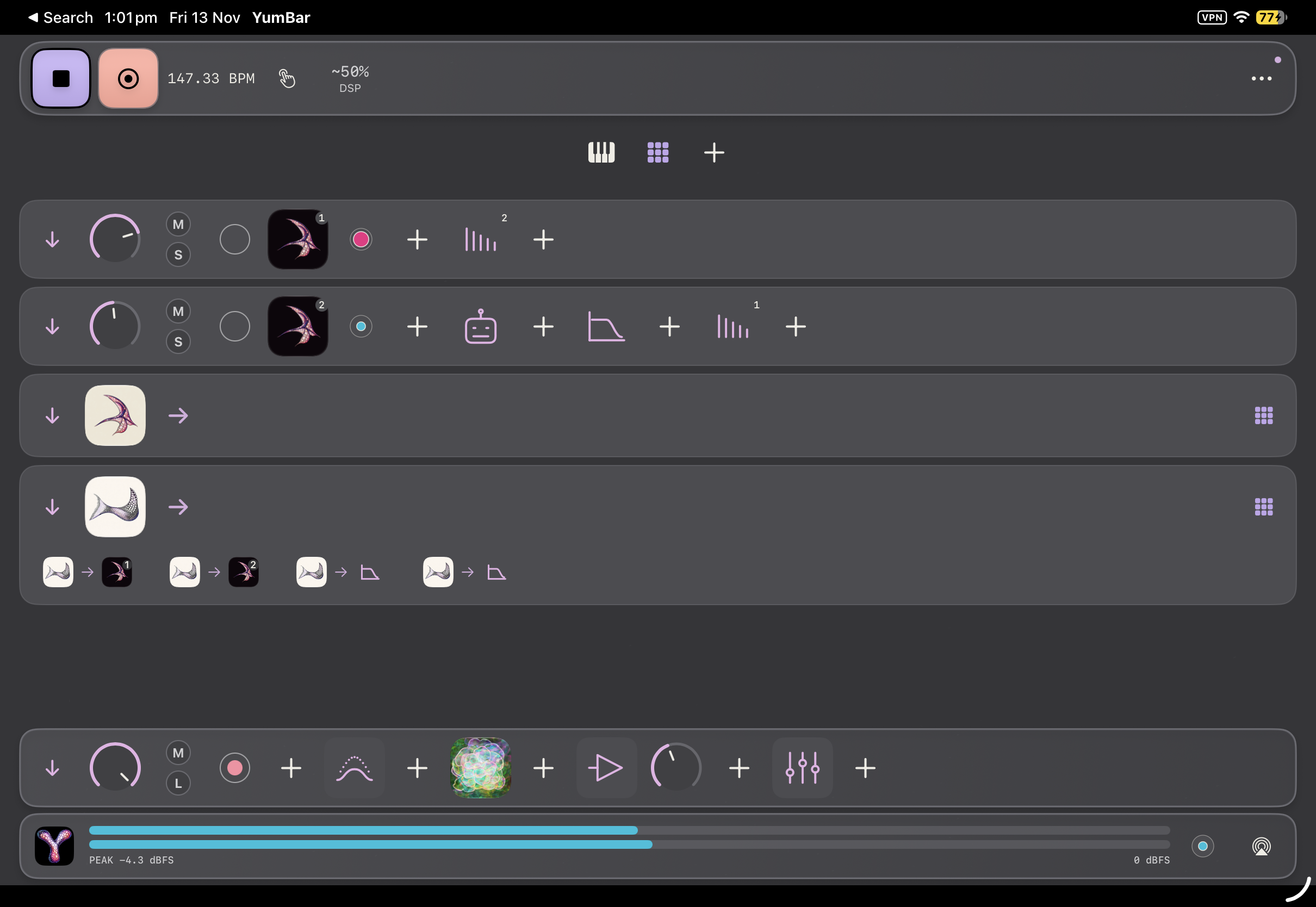
01 / THE MAIN WORKSPACEActual iPad app · Artwork by OcularDebris
A LOOK INSIDE
Your tools. Working together.
From the mixer to the details. Choose iPhone or iPad to explore the app.
Showing: iPad. Choose another device anytime.
iPad · ACTUAL APP SCREENS
01 / iPad
The main workspace
Original iPad screenshots, shown whole. Interface and features may change before release. Third-party instruments shown are available separately.
MADE FOR EXPLORING SOUND
Connect. Shape. Record.
Connect your tools
Load compatible AUv3 instruments, MIDI tools and audio effects. Chain MIDI effects before an instrument, connect generators and arpeggiators, and send MIDI to more than one destination. Mix your channels and share effects with auxiliary sends.
Shape your sound
Explore built-in filtering, EQ, compression, precision delay, creative Drift Delay and vocoding. Use MIDI Learn on supported controls to bring your setup under your fingers.
Convolved
Import compatible mono or stereo impulse responses, from recorded spaces to creative sound-shaping files. Start with 100% convolution, keep the original response or reshape its waveform with an envelope, and save the original audio with your project.
An optional Info view keeps the creator’s name, location, recording method and source links with the IR. Impulse-response libraries are obtained separately.
Bass Exciter
YumBar’s Bass Exciter is my own design for adding body and audible harmonics to low sounds, helping bass speak on smaller systems. Retune, Double and Width invite you to explore pulsing, shifting stereo textures.
See what you hear
Meters, EQ displays and Lissajous visualisation help you explore levels, frequency balance and the relationship between your left and right channels. Teal, purple and hot pink bring OcularDebris’s palette into the workspace.
Keep the good bits
Save projects to return to your routing, plug-ins and settings. Record your playing, or render a mix and separate channels with supported plug-ins when you are ready to take an idea further.
Third-party AUv3 plug-ins and impulse-response libraries are obtained separately. Plug-in compatibility and processing capacity depend on your device, settings and the plug-ins you use.
SOUND IN MOTION
See the stereo.
Recorded in YumBar on iPad. Press play to hear the original audio.
A stereo signal draws changing purple patterns in the Lissajous display. This recording contains instrumental audio, with no spoken commentary.
FROM AMY
A workspace I wanted to make music with.
I made YumBar because I wanted a host I enjoyed making music with, especially on my phone. It grew alongside Fishtail, Vesper and Shabu Shabu, but it is also a home for other compatible AUv3 instruments, MIDI tools and effects.
YumBar is for making music, experimenting with sound and finding combinations you might not have planned. I hope you enjoy using it as much as I do.
Artwork by OcularDebris.
Data collection
YumBar does not collect personal data or track your activity. It does not require an account or include advertising or analytics services. It does not upload your projects or recordings to a developer-operated server.
Link uses local network for time, phase, and tempi alignment
 YumBar